
Architecture
This page describes how expo-morph-carousel is built and what happens during a swipe and while an image loads. The diagrams are .drawio.svg files: GitHub shows them as images, and draw.io (desktop app, or the VS Code extension “Draw.io Integration”) opens the same file for editing. Save from draw.io as SVG with “Include a copy of my diagram” turned on, so the file stays editable.
Building blocks
Section titled “Building blocks”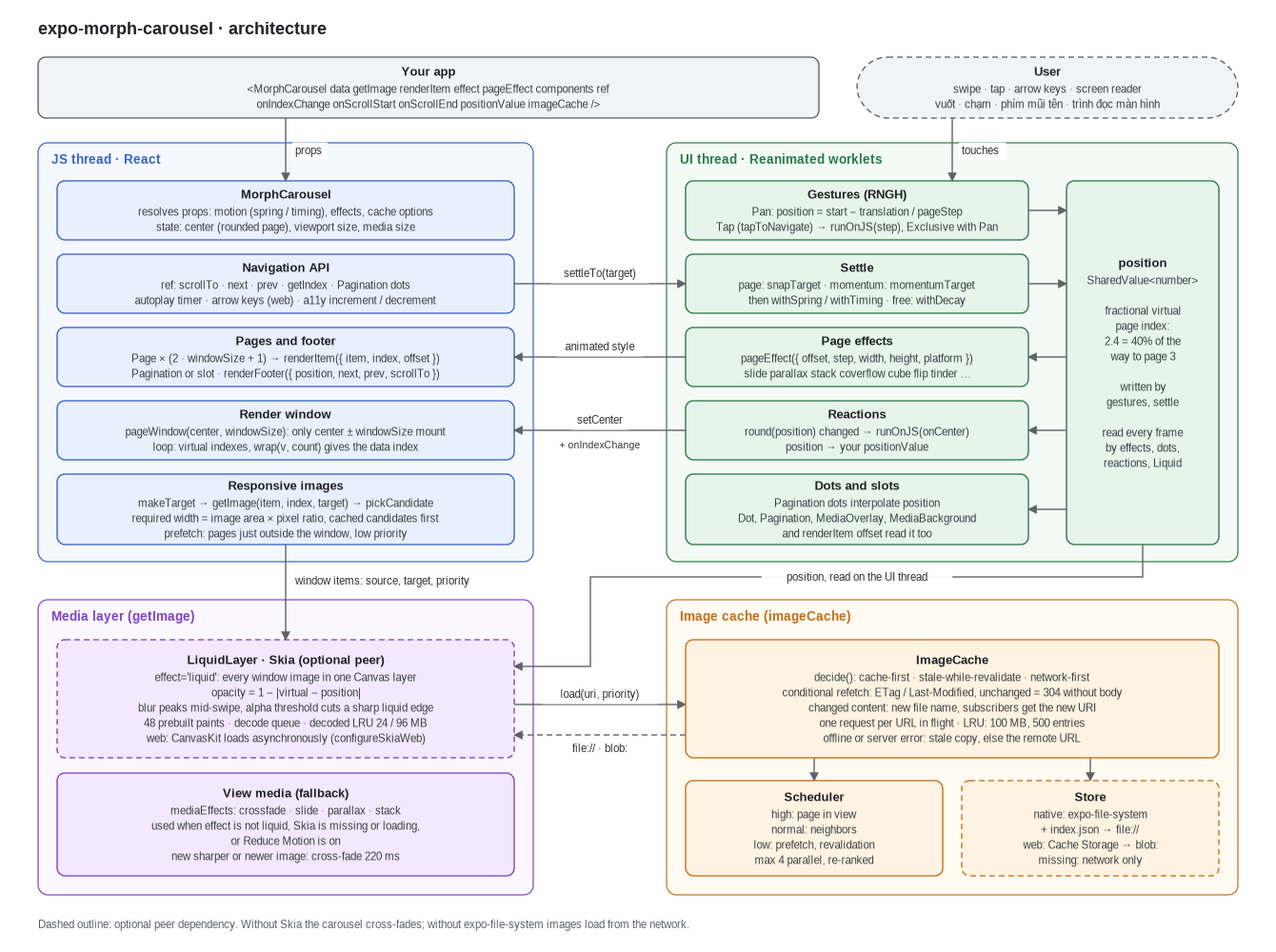
The carousel has four parts.
- JS thread (React).
MorphCarouselturns the props into a render window: onlycenter ± windowSizepages are mounted. It owns the navigation API (ref.scrollTo,next,prev,getIndex), autoplay, arrow keys on web and the accessibility actions. It also picks the image candidate for each page and prefetches the images of the pages just outside the window. - UI thread (Reanimated). One shared value,
position, holds the fractional virtual page index (2.4is 40% of the way from page 2 to page 3). The pan gesture writes it while the finger moves, and the settle animation (withSpring,withTimingorwithDecay) writes it after release. The page effects, the pagination dots, the slots and the liquid layer read it every frame. React renders again only when the nearest page changes. - Media layer. With
effect="liquid"and React Native Skia installed, every image of the window is drawn in one Skia layer. Each image has the opacity1 − |virtual − position|, and the layer goes through a blur that peaks halfway between two pages and an alpha threshold that cuts the blurred edge back to a sharp outline. Without Skia, with anothereffect, or with Reduce Motion on, plain views with a media effect (crossfade,slide,parallax,stack) are used instead. - Image cache. Remote images go through
imageCache: a cache with expiry, conditional requests, a download queue with priorities and a store on disk (expo-file-systemon native, Cache Storage on web).
Skia and expo-file-system are optional peer dependencies. Without Skia the carousel cross-fades the images, and without expo-file-system the images load from the network.
Threads
Section titled “Threads”| Runs on | What | Source |
|---|---|---|
| UI thread | Pan and tap gestures, position, the settle animation, page effects, media effects, pagination dots, the Skia layer |
src/MorphCarousel.tsx, src/pageEffects.ts, src/effects.ts, src/Pagination.tsx, src/liquid/createLiquidLayer.tsx |
| JS thread | Props, the render window, renderItem, the navigation API, autoplay, accessibility, choosing image candidates, image decoding (one per task) |
src/MorphCarousel.tsx, src/responsive.ts, src/useResponsiveImage.ts, src/liquid/decodeQueue.ts |
| Background (I/O) | Downloads, files on disk, Cache Storage on web | src/cache/ |
The JS thread is not involved in any frame of a swipe. It is called only when the nearest page changes (runOnJS(onCenter)), to move the render window and report onIndexChange.
A swipe
Section titled “A swipe”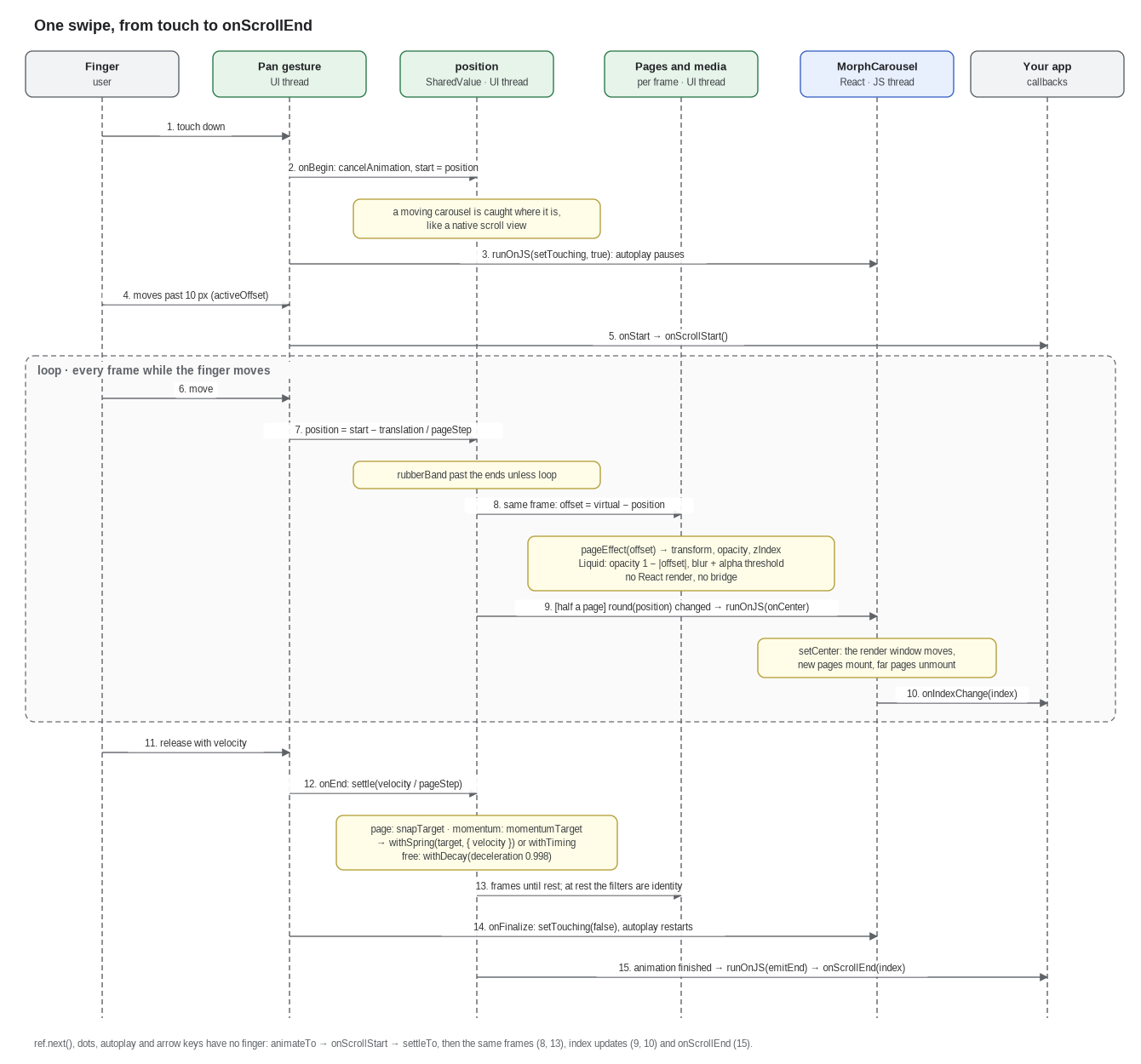
- Touch down.
onBegincancels the running animation, so touching a moving carousel stops it where it is, like a native scroll view. Autoplay pauses while the finger is down. - The finger moves more than 10 px along the scroll axis (
activeOffset). The pan activates andonScrollStartis called. A move of 14 px across the axis first fails the pan, so a vertical list around a horizontal carousel still scrolls. - Every frame while the finger moves,
position = start − translation / pageStep. Withoutloop,rubberBandresists past the first and the last page. In the same frame each page computesoffset = virtual − positionand its page effect returns the transform, opacity and z-index; the liquid layer sets the opacity of each image and picks the paint for the current transition. - Halfway to the next page,
Math.round(position)changes. A reaction callsonCenteron the JS thread: the render window moves (a new page mounts at one end, the farthest unmounts at the other) andonIndexChangeis called. - Release. The velocity in pages per second picks the target: one page in the direction of the swipe (
snapMode="page"), as far as the speed carries ("momentum"), or no target at all ("free", a decay with the deceleration of a native scroll view). The spring starts with the finger’s velocity, so there is no jump at release. - At rest, the liquid filters are identity (the image is drawn untouched), autoplay restarts its timer and
onScrollEndis called.
ref.next(), the dots, autoplay and the arrow keys take the same path without a finger: animateTo calls onScrollStart, then settleTo runs the same animation, reactions and callbacks.
An image
Section titled “An image”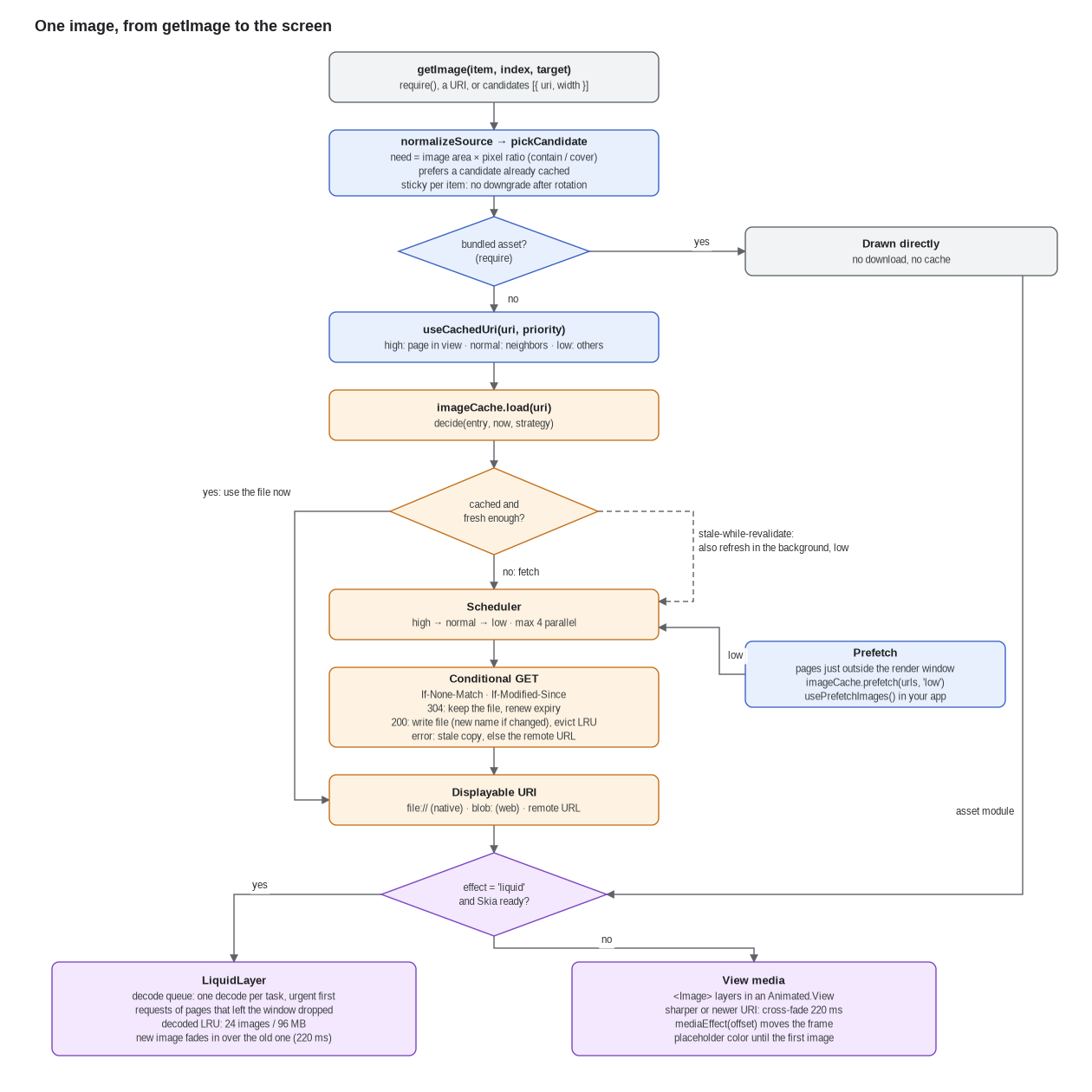
getImage(item, index, target)returns a bundled asset (require), a URI, or candidates with their widths.targetis the drawn area times the pixel ratio, rounded to a few widths, so it can be used to build CDN URLs.- Choosing a candidate. The smallest candidate at least as wide as needed is chosen (the widest when none is wide enough). A cached candidate up to twice the needed width is preferred, so no new download starts. The choice is kept per item: after a rotation to a smaller area the sharper image stays.
- Bundled assets are drawn directly. Remote images go through
useCachedUri(uri, priority):highfor the page in view,normalfor its neighbors,lowfor the rest. imageCache.loaddecides from the cache entry and the strategy. With a fresh entry the file is shown at once; withstale-while-revalidateand a stale entry it is shown at once and refreshed in the background atlowpriority; otherwise it is downloaded.- The scheduler runs at most 4 downloads at a time, the most urgent first, and re-ranks queued requests when a fast swipe changes the priorities. Concurrent requests for one URL share one download. Prefetches (pages just outside the window,
imageCache.prefetch,usePrefetchImages) run atlow. - The request is conditional (
If-None-Match,If-Modified-Since): an unchanged image costs a 304 with no body and only renews the expiry. A changed image is written under a new file name, so image views reload. The least recently used entries are deleted above 100 MB or 500 entries. Offline, a stale copy is shown, or else the remote URL. - On screen. The liquid layer decodes one image per JS task, the most urgent first, and drops the requests of pages that left the window; decoded images are kept in an LRU (24 images or 96 MB). The view layer uses
<Image>. Both fade a sharper or newer image in over the old one in 220 ms, and show the placeholder color until the first image is ready.
| Path | Role |
|---|---|
src/MorphCarousel.tsx |
The component: props, position, gestures, navigation, render window, pages, media, footer |
src/math.ts |
Pure paging math: snapTarget, momentumTarget, rubberBand, pageWindow, wrap, nearestVirtual, tapDirection |
src/pageEffects.ts |
Page layouts (worklets): slide, parallax, stack, coverflow, cube, flip, fade, scale-fade, rotate, tinder |
src/effects.ts |
Media effects for the view layer: crossfade, slide, parallax, stack |
src/liquid/ |
Skia liquid layer, the decode queue, loading CanvasKit on web |
src/responsive.ts, src/useResponsiveImage.ts |
Image targets, candidate choice, swapping images without a flash |
src/cache/ |
ImageCache, freshness policy, download scheduler, stores for native and web |
src/Pagination.tsx |
Default dots |
test/ |
Unit tests for the paging math, candidate choice, the cache, the scheduler, the decode queue and the cube |